Let sound prove the story works
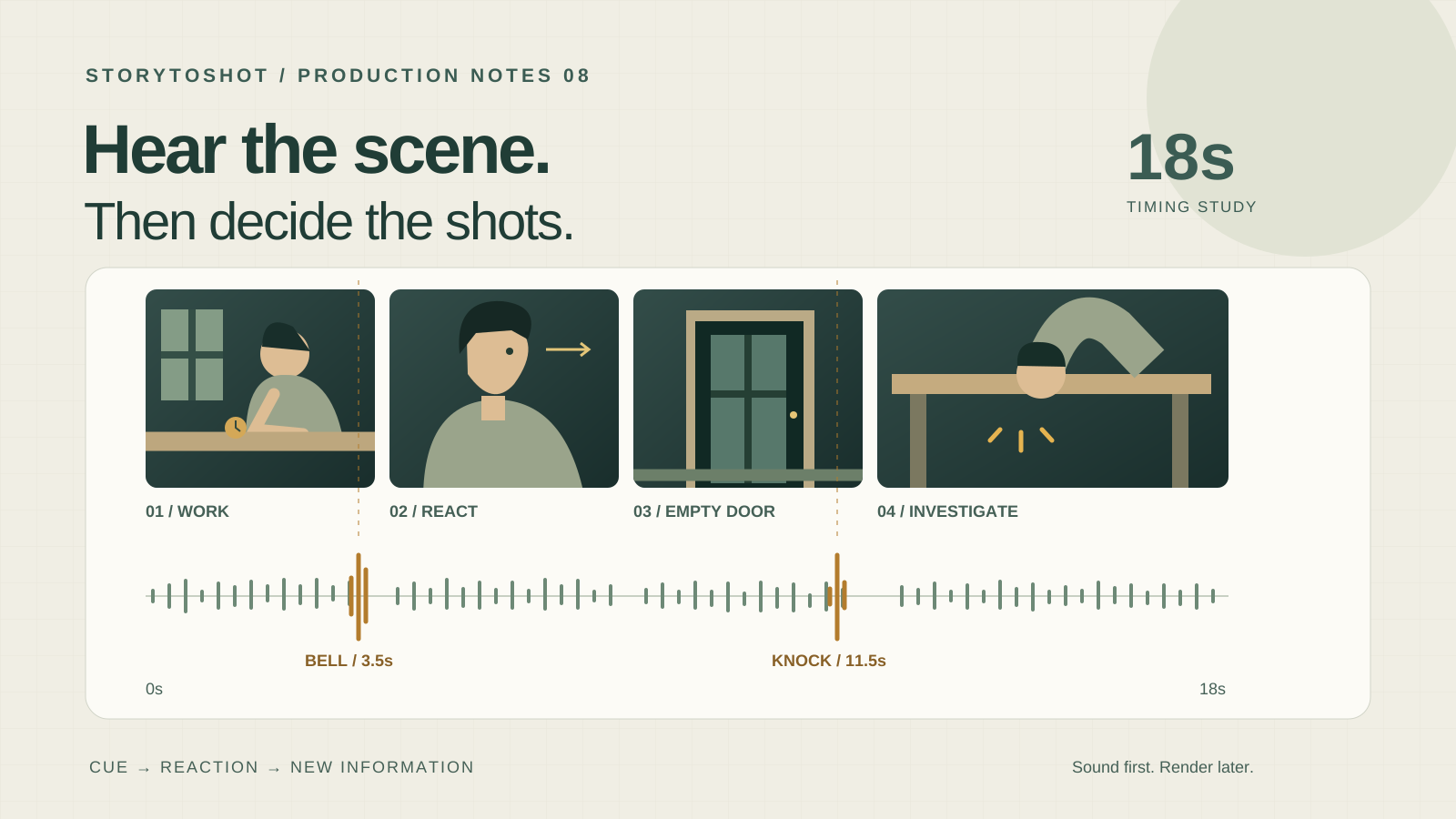
You have generated the shots, but the narration will not fit. Retiming everything to music then makes the character’s reaction feel rushed. These problems can often be found before producing moving images. Build a playable timeline with temporary sound and still storyboard frames first, establish when the audience learns each fact, and only then decide which images need generation. A sound draft tests cause, pauses and duration rather than polished voices. Our example is an eighteen-second suspense scene: a watchmaker alone in a shop hears the doorbell, looks up at an empty doorway, then hears a knock beneath the workbench. The acceptance question is simple: does the viewer understand that sound redirects attention from the door to the space under the bench? Eighteen seconds is this exercise’s budget, not a universal target. Change the timing plan if the story needs more breathing room.
List sound events before adding music
Log four kinds of sound: dialogue or narration that carries words, event sounds that trigger action, ambience that establishes a place, and music that shapes emotion. For each item, write who hears it, what they learn and how the image responds. Here, the bell makes the watchmaker expect a visitor; the knock overturns that interpretation; quiet ticking keeps us in the same shop. Leave music out of the first draft so suspenseful scoring cannot conceal an unclear event. Record rough sounds yourself or use temporary material you have permission to use, marking anything that needs replacement. The bell need not be perfectly realistic yet, but it must be recognizable. If a sound neither changes information nor establishes the environment, remove it temporarily and check whether the scene becomes clearer.
Map the information across eighteen seconds
Arrange four stills: a medium view of the watchmaker from zero to four seconds, a closer reaction from four to eight, the empty doorway from eight to twelve, and the workbench again from twelve to eighteen. Place the bell at roughly 3.5 seconds, followed by the reaction in the next shot. Allow time to register that the doorway is empty. At about 11.5 seconds, introduce the knock from under the bench, then cut back as the watchmaker bends to investigate. Keep quiet ticking underneath; the ending need not reveal the source of the knock. These are editing targets, not timecodes a generator is expected to obey precisely. Play each passage and check that the cue precedes the response. If the doorway passes too quickly to establish its emptiness, lengthen it and borrow time from the already understood watch repair instead of assigning equal shot lengths.
Record scratch speech before planning visible dialogue
Our example has no dialogue, but a narrated version should still begin with a natural spoken recording. Include breaths and pauses instead of estimating duration solely from word count. Read “The door never opened, but the bell rang” once as calm narration and once as a startled thought; the required space will differ. When speech fills every moment, first remove information already shown visually, then try splitting the sentence or extending the shot. Do not speed up the entire passage until it is barely intelligible. Voice-over does not require the visible character to speak. Close-up dialogue does require early testing of mouth movement, performance and vocal timing, so prototype the most difficult line first. Recheck the edit when replacing scratch speech: identical wording does not guarantee identical timing.
Bridge cuts with sound while preserving cause and effect
Sound can arrive before its associated image or continue after that image has changed. Audio from an upcoming shot entering early is commonly called a J-cut; audio from the preceding shot continuing over the new image is an L-cut. The knock beginning over the empty doorway before we return to the bench is an example of sound anticipating the next image. Carrying the ticking ambience across a cut can help preserve the room. Move the sound’s start point first, then judge whether the source and causal order remain understandable. Do not overlap the bell’s decay with the knock so heavily that they seem to be one event. Do not have the character searching before the cue unless the story deliberately implies foreknowledge. A sound bridge connects information; it cannot repair contradictory character positions between images.
Turn the approved timeline into generation briefs
Once the still-frame version reads clearly, give every shot four fields: intended edit duration, observable action, sound cue and trimming room. Shot two might read: “Use roughly four seconds. Begin in the working pose, raise the eyes toward the doorway after the bell, then hold a puzzled expression. Align the bell before the reaction during editing. Retain brief pauses around the action where possible.” This extra material gives the editor room to move the cut instead of trapping the essential action at the clip boundary. Choose a generation duration offered by the actual tool and trim it to the edit. Whether audio is generated alongside video depends on the workflow; even when it is, check whether it can be adjusted separately. Prototype the crucial reaction shot before producing the remaining clips.
Review comprehension, picture and sound in separate passes
First, play the sequence normally to someone who has not read the script and ask them to describe what happened, especially where they believe the bell and knock originated. Second, mute it and inspect complete actions and usable reaction holds; viewers need not infer every sound source from silent images, because sound carries part of the story. Third, listen without the picture to check cue distinction, speech clarity and abrupt gaps in ambience around cuts. Listen through both headphones and an ordinary phone speaker to catch a knock that only registers on one device. If listeners interpret it as a visitor outside the door, adjust its character, timing or the watchmaker’s response before generating more inserts. Record the specific misreading and its time, rather than a vague note that the scene is not tense enough.
Match the repair to the failure
If music masks speech, first reduce it or leave space around the line. If the action works but the reaction is early, move the cut or sound cue. If the empty doorway is unclear, redistribute shot duration. These are good candidates for editing trials. Consider regeneration or a revised shot when the character never looks up, no usable puzzled hold exists, or the mouth consistently forms a different line. Test one explanation at a time and keep the preceding version for comparison. For this exercise, you might agree to return to the still-frame timeline after two unsuccessful repair attempts on the same issue. That is a scope-control rule, not a promise about success rates. Money already spent on a clip is not a reason to assign it a narrative job it cannot perform.
Hand off the sound plan and its limits
Deliver one record containing shot IDs, selected versions, edit in and out points, sound start points, source descriptions, and each asset’s permission or replacement status, alongside a playable draft. When planning in StoryToShot, record action and sound intent in the shot description, then validate timing in editing software; storyboard planning does not mean the mix is finished. This approach is particularly useful for narration, suspense cues and reaction-driven short scenes. Dance, dense visible dialogue and complex ensemble action still need more detailed beat, performance or synchronization tests. Final loudness and format must also follow the actual delivery platform’s requirements; temporary playback levels are not delivery specifications. Preserve the rhythm that makes the events understandable, rather than every second written into the first draft.