1. Define what the style must do for the story
Every reference looks good, yet the generated shots seem to come from three different films: a neon advertisement, a fashion portrait and a product photograph. The references express preferences without shared rules. Consider a fictional eighteen-second film: a girl finds a red glove at a rainy station, catches up with an older man and returns it. The intended mood is restrained and cold, with warmth between people. The glove must remain noticeable, faces readable and station lighting motivated. Translate references into observable visual constraints, then test whether those constraints survive across shots. This tutorial makes no model-specific parameter promises and does not infer batch reliability from one attractive sample. It suits short films that need a visual direction before substantial generation begins.
2. Give each reference a specific job
Choose one main reference for the overall direction and a few supporting images for details it does not show. For this example, use your own station photograph for light sources, a self-made color board for palette relationships and a portrait cleared for the intended use for skin and shadow. Label each image: “Use only the relationship between the overhead light and the side of the face; ignore clothing and identity.” If two references prescribe soft diffuse light and hard flash for the same moment, choose between them before generation. Record source, version and permitted use. Being able to open or download an image does not establish permission to upload, adapt or use it commercially. Remove images without a specific job from the working board; they can remain in an inspiration collection.
3. Break a cinematic mood into five visible rules
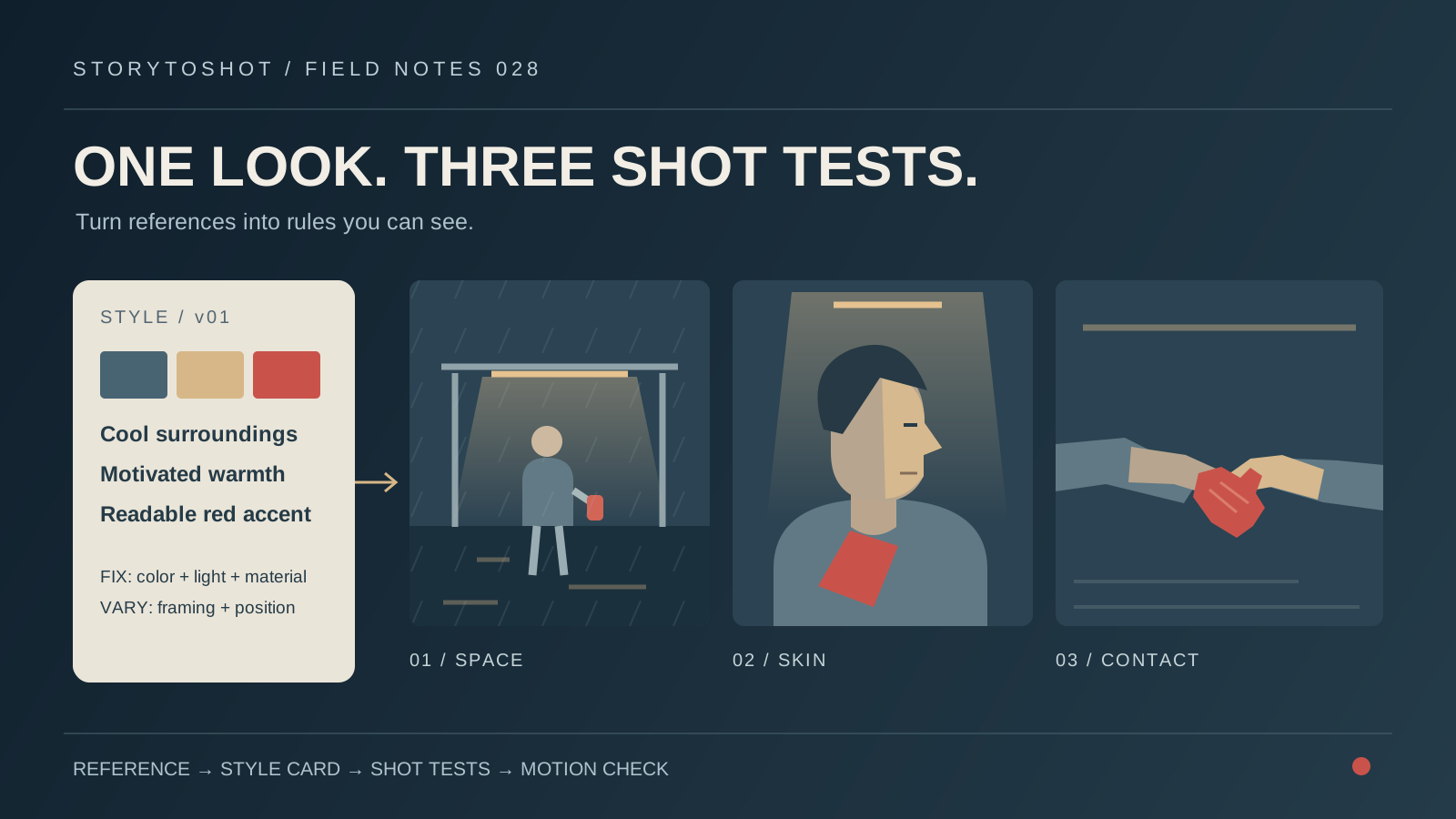
Inspect color, tonal relationships, light sources, material and composition in turn. Example rules: a muted blue-gray background with the red glove as a story accent; visible detail on the shadow side of faces and beneath overhead highlights; warm light mainly from shelter fixtures; damp coats and pavement without a plastic mirror finish; enough surrounding space to establish the station. Each rule should support a judgment of match, deviation or insufficient evidence. Color codes alone are inadequate: area, brightness and neighboring colors change the emphasis of a swatch. Avoid piling on words such as premium, ultra-detailed and epic. If a word cannot be tied to a visible relationship, it cannot serve as an acceptance criterion.
4. Separate film-wide rules from shot variables
Consistency does not require identical histograms, depth of field or subject sizes in every shot. Make two columns. Film-wide rules cover background color relationships, skin treatment, damp materials and lighting logic. Variables cover framing, subject position, visible sources and the depth needed to read the action. A wide shot can keep people small, a portrait must reveal the eyes, and a glove close-up must show fabric and finger contact. They can still belong to one world. Do not add unexplained orange light to someone outside the shelter just to preserve warmth. Annotate why a shot may vary. A move from a cold street into a warm interior can deliberately change the look, provided the transition and spatial cause are established.
5. Test the look on three demanding shot types
Do not approve only the easiest flattering portrait. Test a station wide shot, a side-view medium close-up and the handoff detail, stressing space, skin and contact. View them together in story order. Does red still emphasize the glove? Do pavement reflections steal attention? Has the portrait become a dry studio photograph? Does the detail retain the same lighting relationship? Keep original outputs and working records, and compare under consistent viewing conditions rather than filtering only one image. Passing three samples establishes those samples as usable; it does not establish reliability for other angles or long actions. If the budget permits only one test, choose the shot with the hardest combination of story and style requirements and state what remains untested.
6. Write a reusable style card
Reuse this card: “Direction: restrained realism at a rainy station. Color: muted blue-gray surroundings with a distinguishable red glove. Tone: detail on the shadow side of faces; bright fixtures must not conceal essential expressions. Material: wet fabric, worn metal and localized pavement reflections. Sources: warm shelter downlights and cool ambient light. Avoid: unexplained neon rim light, plastic skin and an overall orange cast. May vary: shot size, subject scale and position-dependent illumination.” Add a shot-specific line: “S03: two hands exchange the red glove; contact stays clear; the background retains the station palette.” This is a human production brief to translate into inputs your tool actually supports, not universal parameter syntax. Reference-image input methods likewise depend on the tool in use.
7. Diagnose a mismatch before changing one layer
If all three images are too orange, inspect the dominant warm area in the main reference and repeated warmth cues in the shared description. If only the detail is orange, inspect that shot’s local input and reference crop first. Change one main layer at a time, such as replacing an unsuitable supporting reference or specifying where warm light falls, and retain a before-and-after comparison. Changing references, model, prompt and grade together makes any improvement difficult to reproduce. Grading may help modest color mismatches, but it cannot reconstruct light direction, turn plastic-looking material into cloth or uncover an essential hidden finger. Fix deviations that damage story information in the image or boards; document harmless natural differences as permitted variation.
8. Check the look in motion after approving stills
Use approved references in a short motion trial. Watch at normal speed, then inspect the beginning, middle and end. Do faces lose shadow detail as people move? Does the glove fluctuate in brightness? Do pavement textures flicker? Does approaching skin become excessively smooth? A consistent frame does not make an entire clip editable; changes near essential actions are particularly distracting. If instability is confined to a short interval, assess whether removing it preserves the complete action and editing handles. Trimming must not hide necessary information. Play neighboring shots consecutively to catch unintended brightness or color-temperature jumps at cuts. Motion approval requires actual footage and cannot be inferred from still references.
9. Freeze a usable style package and record its limits
Package the main reference, usage labels, style card, three approved samples and motion test as style_v01, noting untested shot types. A new collaborator should be able to explain what must stay and what may change, rather than receiving only a collage. When an interior scene or an extreme close-up is added, test it before deciding whether to update the package. Do not silently replace references while shots are in progress. This method makes a visual direction executable; it does not replace character identity sheets, spatial plans or color management for final delivery. Finish when story emphasis is clear, essential style rules hold across tested shots and remaining limits are documented, rather than when every image looks identical.