1. Review a pair of shots, not just an isolated clip
An individual clip can be beautifully composed and still resist editing. The first shot has already handed over the ticket, but the next begins by taking it out again; or the ticket suddenly changes hands. The problem may be the missing connection between clips rather than either clip in isolation. Our fictional station scene follows a traveler holding a ticket the wrong way around, an attendant signaling to turn it, the traveler turning and offering it, and the attendant accepting it for inspection. The central method is to prove that adjacent shots connect before generating more material. Coverage means sufficient viewpoints and action phases for this particular scene, not a complete collection of every shot size. Timings, handles and shot counts below are working examples, not claims about any model.
2. List the events viewers must see before choosing angles
List three indispensable events: the attendant indicates that the ticket faces the wrong way, the traveler turns it, and the attendant takes possession. For each event, identify whose view matters and what image will prove it. A wide shot can establish the two people across the counter, a closer view can clarify the gesture, and a hand insert can show the turn and transfer. A character close-up does not automatically cover the action: a facial reaction cannot prove that the ticket turned. Sketch the shortest understandable route through the events before adding angles. If one medium shot clearly shows both the gesture and the turn, two extra shots may add little. Coverage is sufficient when the necessary information is readable.
3. Write a paired specification for every cut
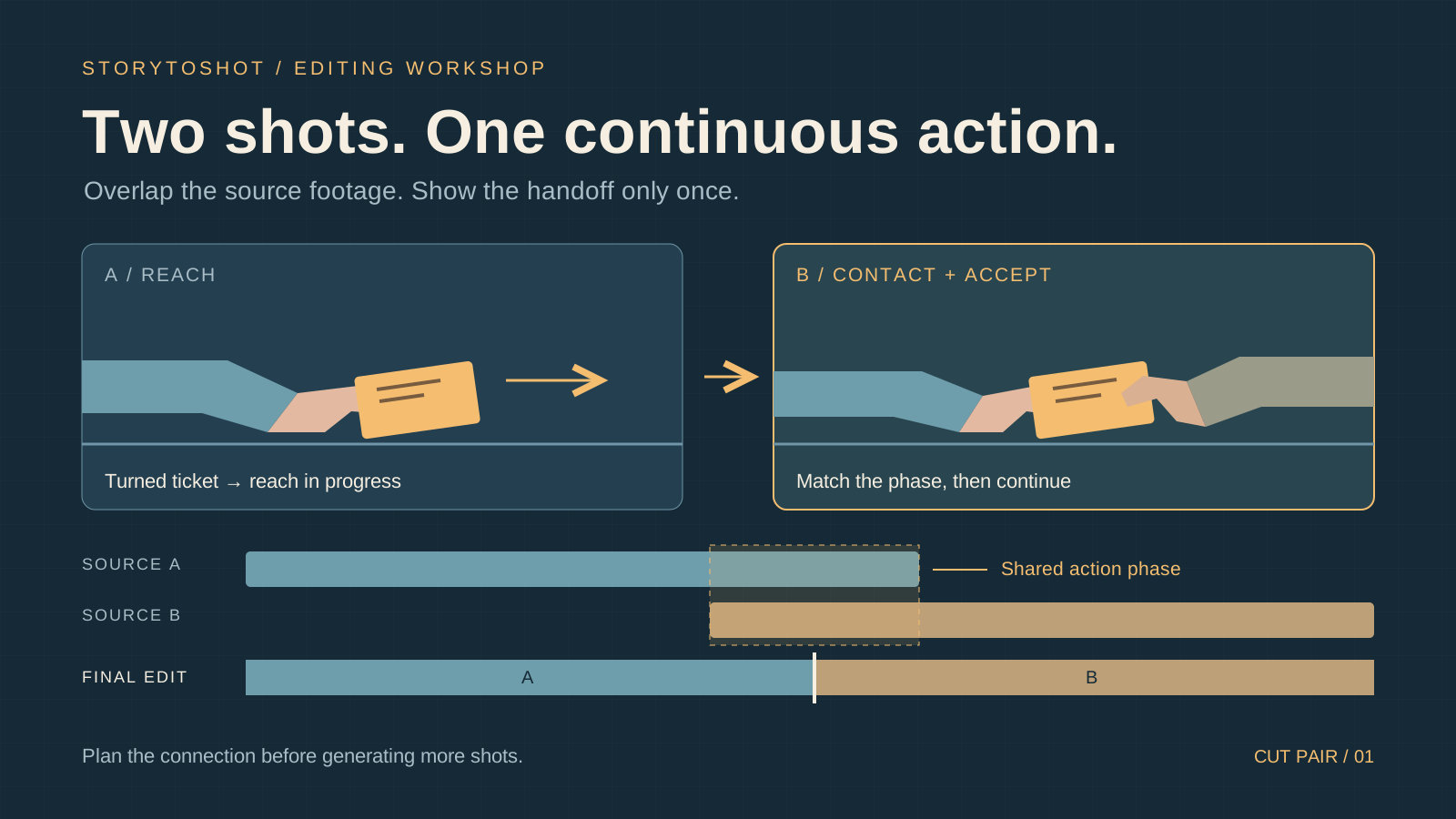
Place the intended neighbors side by side and record the outgoing action phase, incoming action phase, ticket hand, movement direction and the viewer’s focus. For example, a candidate exit from medium shot A is “the traveler has turned the ticket with the right hand and begins extending it toward the counter center.” A candidate entry into hand close-up B is “the same right hand holds the correctly oriented ticket and extends from frame left toward the center.” Record shared anchors: the same side of the counter, cuff, ticket and post-turn state. Check screen direction against the actual camera positions instead of requiring every angle to move right. Resolve missing constraints on the boards before generation, rather than guessing afterward. A generation brief for B could read: “Locked close-up. The traveler’s right hand extends the correctly oriented ticket toward the center. The attendant’s left hand makes contact and takes it; the traveler releases and withdraws. Contact must visibly precede release.” Record action requirements separately from character and wardrobe references. If the tool offers reference-image input, use an approved hand-state image; do not assume unavailable controls exist.
4. Cover the action twice, show it once in the edit
If A ends just before the reach and B starts after the ticket has been accepted, there is no shared action phase in which to choose a cut. Plan A to include turning, reaching and a brief hold. Plan B to include the latter part of the reach, contact and acceptance. The source clips repeat part of the action, but the finished sequence shows it once: cut from A midway through the reach into B at a corresponding phase, then continue the transfer. Concatenating both entire clips would repeat the reach. Correspondence requires more than similar hand positions; inspect ticket orientation, finger contact and motion speed. If the movements differ substantially, adjust the cut or remake the relevant passage. Overlapping coverage does not automatically remove discontinuities.
5. Leave useful handles around the cut
Editing handles are usable material before the chosen in-point and after the out-point; they do not require a frozen performer. For a shot expected to contribute three seconds, try roughly half a second of natural movement or a stable pose on either side of the candidate range, then judge the allowance in an actual rough cut. A beginning with a changing face or malformed hand is not usable merely because it has duration. The same applies to a distorted ticket at the end. “Five-second source; usable range 0.8–4.2 seconds” is more useful than total duration alone. These numbers are only an initial test for this example. If the tool limits output length, reduce the action load or change the cut. Do not accelerate the central action just to create handles or present a freeze-frame extension as continuous movement.
6. Test editability with three core clips
Start with a small package: A is a two-person medium shot covering the signal, ticket turn and reach; B is a hand close-up covering the reach, contact and acceptance; C is a closer view of the attendant inspecting the accepted ticket. A and B share the reach; B and C share the state of holding the ticket after acceptance. Rehearse with sketches, then test those two connections before generating platform views, trains and many expression alternatives. Assemble usable ranges and watch at normal speed. Look for a repeated turn, missing transfer or changed hand. Still images reveal state mismatches; a moving rough cut reveals speed and pause problems. If a connection fails, identify which side lacks the necessary usable phase before choosing what to remake.
7. Add a shot only to solve a specific gap
When the rough cut fails, distinguish missing action, missing reaction and missing spatial information. If the ticket never visibly leaves the traveler’s hand, add evidence of transfer. If the reason for turning it is unclear, add the gesture or an angle that makes the error readable. If the positions are confusing, clarify the relationship between the people. A beautiful train cutaway cannot simply excuse a ticket changing hands without explanation. If the transfer is not central to the story, you can deliberately omit it: establish the intention to offer, cut to a meaningful reaction, then return to the attendant holding and inspecting the ticket. This changes how information is presented and needs a new review. Inserts cannot repair every error. Give each additional shot one specific problem and a pass criterion.
8. Review motion, state and comprehension separately
First watch at normal speed and ask whether the action flows, noticing sudden acceleration, pauses or repeated reaching at a cut. Then step through frames on both sides to inspect ticket face, cuff, grip and subject position. Frame inspection locates the problem; it does not require identical adjacent images, since a change of shot size changes scale. Finally, ask someone who has not seen the boards to retell who signaled, who turned the ticket and who held it at the end. If the answer is only “two people doing paperwork,” ask about the specific actions to find out whether attractive imagery obscured essential information. Attach the issue to the pair: “A→B lacks the beginning of the reach after the turn” limits rework better than “the edit feels wrong.”
9. Lock approved connections before expanding the film
Once the connections work, save the pair specifications, reference versions, usable source ranges and approved rough cut, identifying the action phases that must remain. Later grading, expression changes or duration adjustments should trigger a review of the affected neighboring connections, not automatic replacement of all footage. In StoryToShot, use the boards to describe the viewing task and start and end states. The moving rough cut and source-range records discussed here belong in the editing tools you actually use; this tutorial does not assume the website has an automatic clip-assembly feature. The method suits short scenes built around causal action. Music montage, deliberate jump cuts and uninterrupted long takes need different criteria. The aim is not to show every action completely, but to leave sufficient, verifiable editing choices for the intended storytelling style.