1. Decide where the audience is listening from
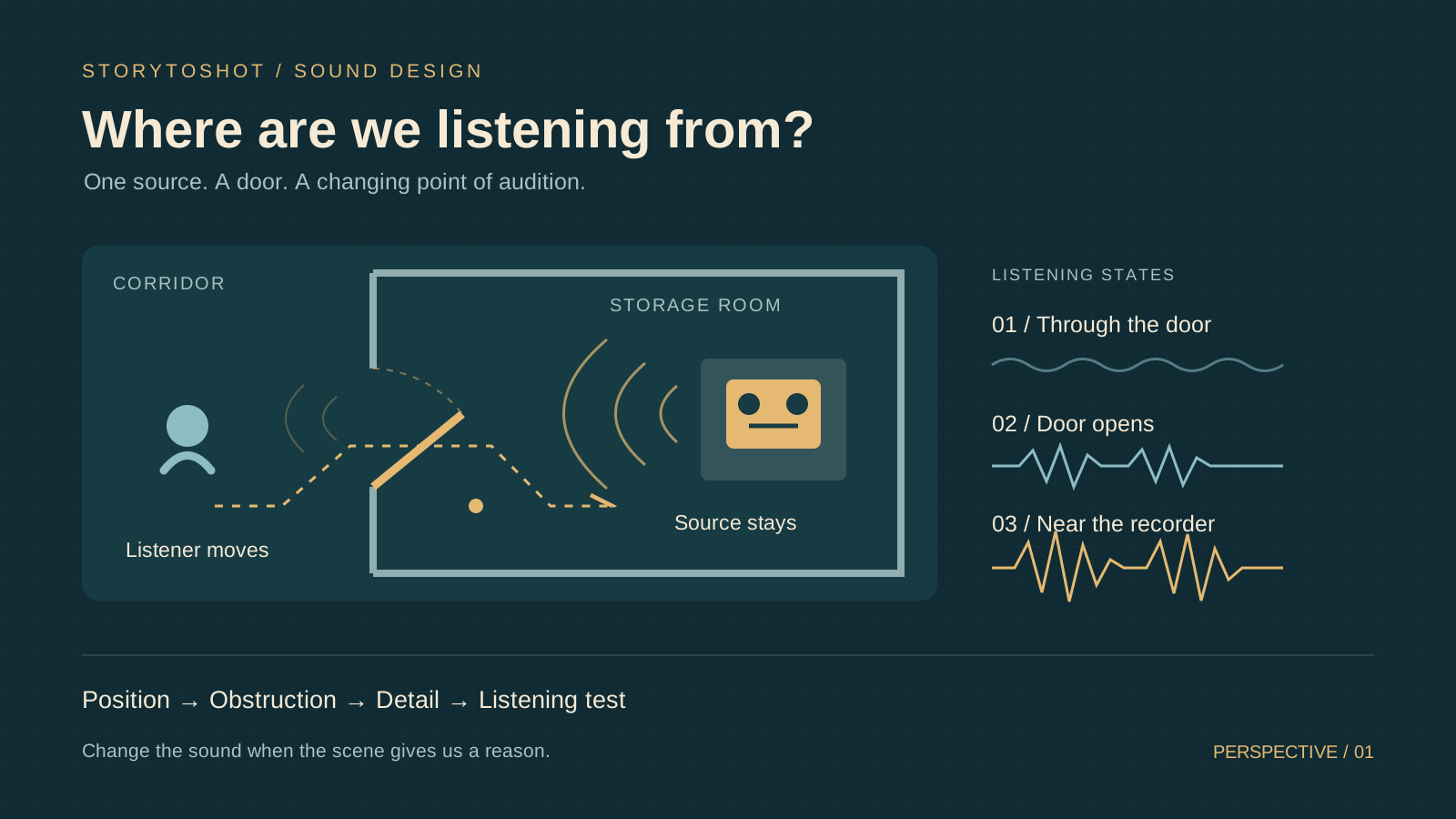
A character stands in a corridor, yet a recorder inside a room sounds as close as headphones. A cut to the door handle makes the rain vanish. Images can establish a space while the soundtrack pulls it apart. Our fictional four-shot exercise follows a repairer approaching a storage room on a rainy night, hearing a recording, opening the door, finding the machine on a desk and pressing stop. Begin each passage by choosing a listening position, then decide how sound changes. This position places the audience somewhere in the space and gives them a particular focus of attention. It may follow a character or remain relatively fixed. Describe the audible spatial relationships before finding or making assets so that you can distinguish a source problem from a placement problem.
2. Anchor sound sources to a simple room plan
Mark the corridor, door, desk and window on a sketch. Rain remains outside the window, the recorder stays on the desk, and footsteps travel with the repairer. For each source, record whether it moves, whether something blocks it and when it starts or stops. In this example the listening position follows the repairer. The closed door muffles the recording, opening it improves clarity, and approaching the desk reveals more detail. Exact measurements are unnecessary, but the relative positions must remain stable. If the recording jumps between left and right, inspect the character orientation and listening position before changing the pan control. A camera crossing to another angle does not automatically require a reversal of the established auditory orientation.
3. Build a reusable sound sheet for four shots
Give each row a shot ID, listening position, source state, change trigger and pass condition. Shot A provisionally occupies seconds zero to four. In a corridor medium shot, follow the repairer and hear a faint recording. The audience should recognize speech inside without understanding its words. Shot B occupies seconds four to seven and shows the door handle. Keep listening from the character position, with the opening door triggering improved clarity. Shot C occupies seconds seven to twelve as the repairer enters and approaches the desk. The recording draws attention while rain still establishes the exterior. Shot D occupies seconds twelve to sixteen. The finger presses stop, the recording ends on the action, and rain and room ambience remain. These timings are rehearsal choices. Another editor should be able to identify the event responsible for every change. Copy this row as a template. “Shot B, character listening position, desk recording continuous, gradually restore detail as the door gap widens, audience hears the door opening while the source stays in place.” A shot-size change can retain this row. A retreat into the corridor needs a new state.
4. Make distance readable through related cues
Choose one recording with a stable voice and rhythm, then make distant, middle and close listening versions. For the distant version, try lower relative level, less intelligible detail and a balance between direct sound and reflections suited to the room. The close version should clarify the words that matter. Change one factor at a time and compare against the same image. Raising level and adding reverberation together makes causes harder to isolate. Reflections, source orientation and background noise all influence perceived distance, so a darker timbre is not a universal distance rule. Pass the test when viewers hear the repairer approaching the same machine while its identity, speech rate and content remain continuous. Compare the three versions individually, then sequence them in approach order to check for abrupt steps. If each sounds natural alone but the sequence suggests different speakers, reduce the treatment differences and preserve recognizable vocal identity.
5. Let the door action control occlusion
For sound through a closed door, start by testing reduced high-frequency detail and lower relative level, then judge the treatment against the door material, gaps and scene style. Lay the recording continuously along the timeline before automating its treatment around the opening action. Switching to a different-sounding recording at the first movement can break source identity. A small opening might reveal some detail before the fully opened door establishes the interior sound. If listeners interpret the change as someone turning up the machine, inspect the transition speed and whether the image supplies evidence of the door opening. Avoid applying one filter setting to every scene. Use a before-and-after comparison of the same source to establish the obstruction.
6. Decide shot size and listening position separately
The handle close-up changes visual attention. In this example the listening position still follows the person, so neither recording nor rain needs to jump closer with the image. To show recognition of a familiar voice, you could briefly emphasize the recording and pull the environment back, using a pause or expression to introduce a subjective passage. Specify its exit in advance, perhaps restoring the room perspective as the hand reaches for stop. Without clear entry and exit cues, listeners may infer that the rain stopped or the machine moved. Establish a spatially stable version first, then compare a subjective version to see whether it adds emotional information or weakens the readability of opening the door and approaching the desk.
7. Keep source assets and spatial treatment organized
Prepare five asset groups for the recording, footsteps, door, rain and room ambience, retaining untreated versions. If a generated video includes sound, inspect it for existing speech, footsteps and rain, then decide what to retain or replace so that each event occurs once. An asset brief might request “steady rain outside a window, no thunder or music, with natural extra material at both ends.” Record spatial treatment separately. Track export depends on the actual tool. When only a mixed soundtrack is available, assess whether clean replacement is feasible before proceeding. Name files with source IDs and versions and record usable ranges. After regenerating an image sequence, use that record to realign the door and button events.
8. Locate spatial errors in three listening passes
First play picture and sound normally and ask someone unfamiliar with the sheet where the recording is, when the door opens and when the character approaches. Next listen with eyes closed for unexplained source jumps and continuity of rain and room ambience after the machine stops. Finally, compare ordinary headphones with a phone speaker at comfortable levels, checking that essential conclusions do not depend entirely on stereo placement or barely audible details. Record one specific misreading at a time, such as “all words are intelligible before the door opens in B,” then inspect the early clarity change. Short comparisons are easier to judge than repeatedly increasing monitoring volume. This procedure checks narrative space. Final loudness needs separate acceptance against the recipient’s delivery requirements. If a listener interprets opening the door as the recording restarting, check for a break in the source and a simultaneous loss of ambience. Repair one issue, repeat the same question and retain both listening versions so that the comparison stays meaningful.
9. Lock the listening rules for handoff
After approval, save the room sketch, four-shot sound sheet, listening reference, original assets and processing notes. Identify action-synchronous changes and subjective passages. When a camera angle changes, first ask whether the listening position changes with it. When the door timing changes, review the corresponding audio transition. Use storyboard descriptions in StoryToShot to record sources and triggering events. Carry out the mixing and automation in your audio or editing tools. This method suits short scenes where the audience needs to understand spatial and action relationships. Music montage, dreams and deliberately abstract sound can follow other rules. Collaborators should still understand the intended changes and confirm their effect through a concrete listening test.