1. Ask whether this shot is deliverable before asking which model is best
A model can make beautiful landscapes without delivering the hand action your shot needs. A less spectacular result may preserve the crucial action. Choose against delivery requirements instead of ranking unrelated demos by appearance. This fictional six-second product shot follows a person placing a red square box inside a white mark on the right of a table. The hand releases it, the box settles, and its label faces the camera. The question is which generation setup deserves further production work for this shot. Durations, trial counts and scores below are exercise choices, not platform limits or measured claims about any vendor. The aim is to eliminate clearly unsuitable options within a small budget and retain reasons that another person can review.
2. Separate mandatory gates from qualities you can improve
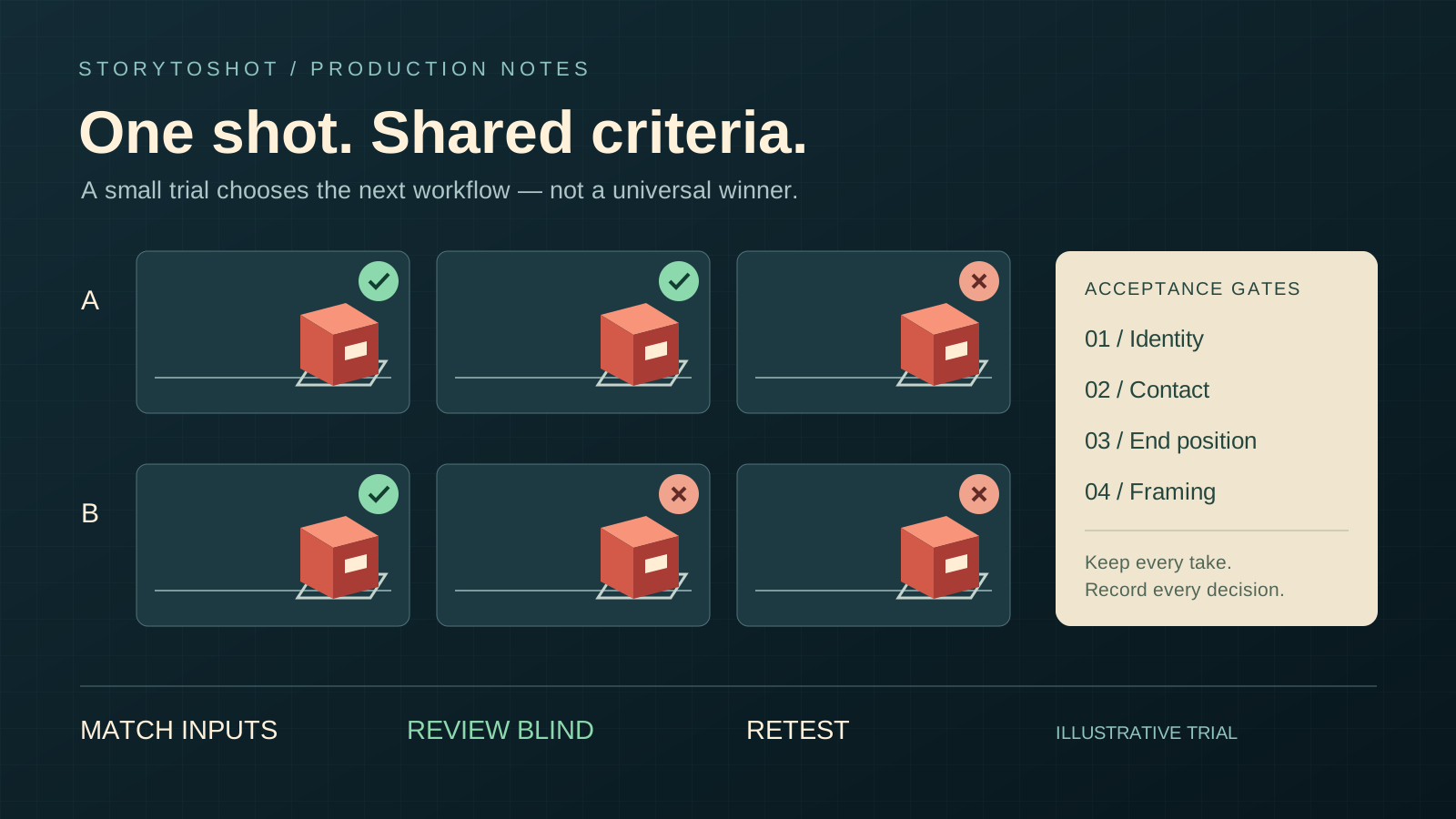
Write the mandatory gates first: the box remains the same object; hand-to-box contact is readable; the box settles inside the target area; and framing preserves the critical action. A failure means the take is not directly deliverable. Then list qualities to improve: lighting fidelity, natural motion and a clean background. Do not blend both groups into one total score, where beautiful lighting could compensate for broken physical contact. If label wording must be exact, decide in advance whether compositing will supply it and use that delivery method across all setups. If the original generation must preserve the lettering, make text accuracy mandatory. Do not quietly relax that gate after seeing the results.
3. Compare the same task and disclose conditions you cannot match
Prepare an approved starting reference and a shot brief that fix composition, character, box position, action endpoint and camera behavior. Only candidates supporting that input method belong in this direct comparison. Put text-only candidates in a separate task group instead of treating unequal inputs as evidence of model quality. Match target duration and aspect ratio where possible, and record actual output differences. Adapt prompt formatting to each tool without giving one candidate extra action breakdowns or a better reference. If you intend to compare each tool’s best workflow, different inputs are acceptable, but say that the comparison concerns complete workflows, including preparation and manual repair.
4. Write a reusable test card
Copy this test-card structure: shot P03; product-placement demonstration; approved reference R02; target six seconds with a locked camera; action begins with a held box and ends with the box settled inside the white mark. Example brief: “Medium close-up of a tabletop. A person slowly places the red square box inside the white mark on the right. After its base touches the table, the fingers release and move away. Preserve the box’s shape and orientation. The camera stays still.” This expresses a target, not a guarantee. Record model name and version, invocation date, input files, available settings, task ID and original output. If a tool does not expose a parameter, mark it unavailable instead of inventing a seed, version or internal process.
5. Set the trial count before viewing results and keep failures
For example, give A and B three initial attempts each and retain every output. Fix the attempt count first, then record actual charges and waiting time separately: equal counts do not mean equal costs. If the budget supports only one attempt per candidate, treat it as a risk probe rather than an estimate of reliability. After the initial round, permit one documented prompt revision for each candidate, followed by equal numbers of new attempts. Report the rounds separately. Do not try A ten times and B once, then compare their best-looking outputs. Repeated fatal failures can justify stopping early, but record why and mark the candidate as having an incomplete matched trial count.
6. Review action without model labels, then assess style and repair
Temporarily assign random filenames so reviewers do not initially know the source. Watch at normal speed to judge whether the action works, then inspect contact, occlusion, release and settling frame by frame. Slow playback locates defects; return to delivery speed for the final judgment. Record pass, fail or repair needed, with evidence such as “At 2.4 seconds, the box intersects the table before release.” Use the same reviewer and check order across outputs, and ask another person to review borderline cases. Only takes passing mandatory gates enter the style comparison. If cropping, frame repair or compositing is allowed, actually repair a representative sample and time it. “Probably fixable” can simply transfer generation risk to the editor.
7. Explain cost through usable results without turning samples into probabilities
Suppose two of A’s three takes pass and one of B’s three passes. That describes this round; it does not establish long-run success probabilities of two-thirds and one-third. Divide the round’s actual generation spend by its passing takes to report observed spend per acceptable asset. With no passing takes, mark the round as yielding no acceptable assets instead of entering zero cost. List repair time separately, combining it with money only after agreeing on a labor rate. Distinguish individual waiting time from total turnaround. This example contains no supplier prices. Before purchasing, check current official billing terms, charging for failed tasks and output options, then enter the actual charges.
8. Run a confirmation round and bound the conclusion
Retest the initially promising setup on the same shot to reduce the risk of selecting a lucky result. Do not quietly substitute easier framing. Use a new card for another angle or prop. A bounded conclusion might be: “With reference R02, a locked camera and these settings, A produced more acceptable assets in this round and proceeds to a P03 production trial. Finger release still needs close review.” That does not mean A suits all product videos. Changes in action complexity, character count, lighting or input can invalidate the conclusion. If neither candidate passes, simplify the action or split placement and display into separate shots, then test the revised task. That solves a shot-design problem; it does not mean the original test passed.
9. Bring the selection back into storyboard production
Hand the team a shot card with evidence, not merely a model name: input image, prompt revision, test date, index of all outputs, gate decisions, known defects and the next round’s budget ceiling. During storyboard planning in StoryToShot, define what viewers must see in each shot, then run samples in the actual generation tool. This tutorial does not assume the website offers automated model benchmarking. Adopt a workflow for the task actually verified and reconfirm it after version or critical-input changes. Small trials help screen options; they cannot prove batch reliability or establish commercial permission. Check tool terms and asset permissions separately for commercial work, likenesses or client materials. Passing visual review does not satisfy those conditions.