1. Inspect the file the recipient actually receives
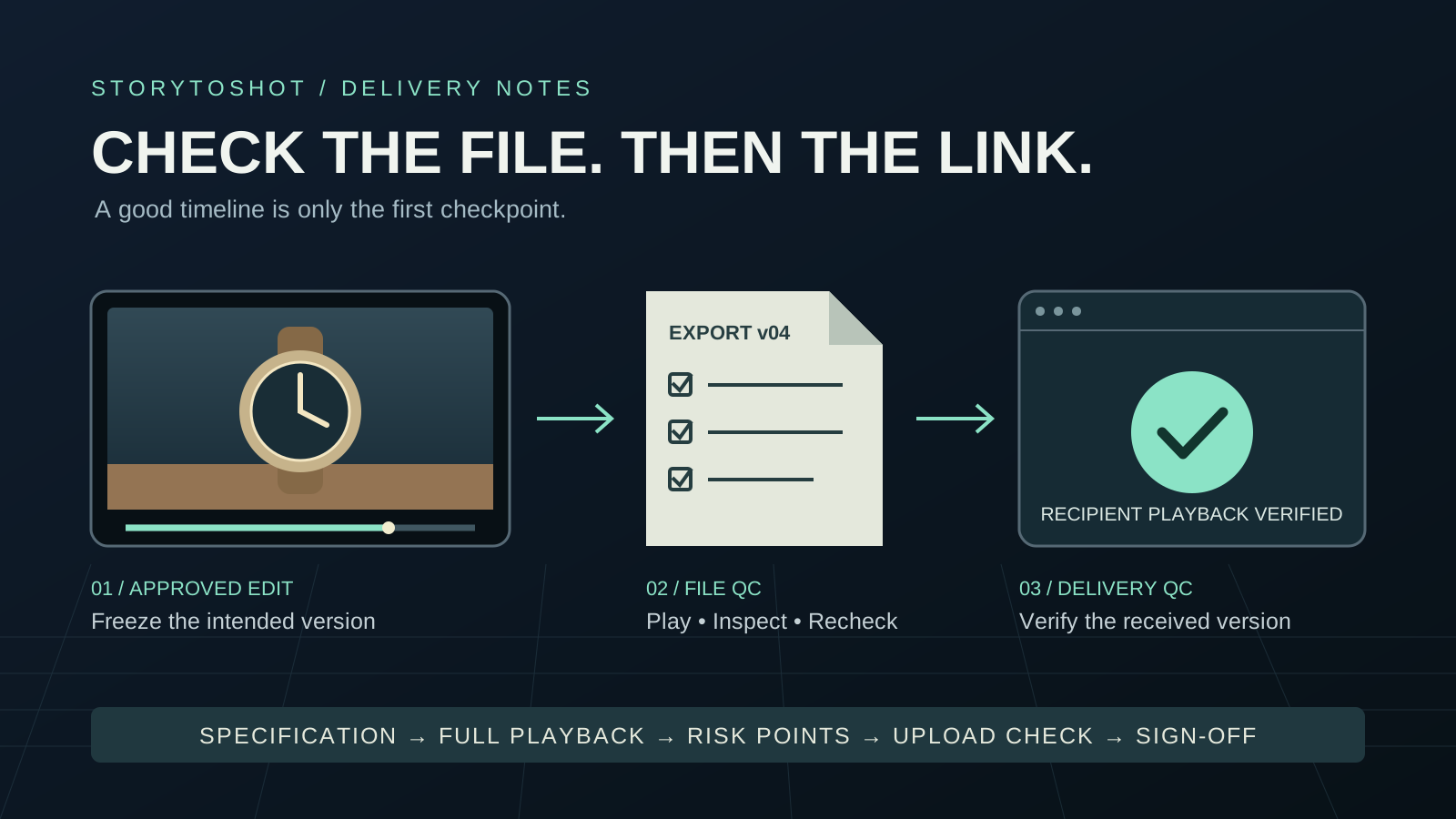
A subtitle can be complete on the timeline while the sent file contains old copy. A local ending can work while playback after upload ends early. Generation, editing, export and upload are separate stages; approval at one stage does not approve the next. This fictional exercise uses a thirty-second watch-repair film: a customer leaves a stopped watch, the owner repairs it, and a final card gives the shop name and booking information. Treat the final file as a separate work, inspect it from beginning to end, then verify the uploaded result. This is delivery QC; whether the story works should have been decided in creative review. Identify the version, recipient and playback destination first so that you do not inspect one correct file and send another.
2. Replace assumptions with a delivery specification card
Before export, record aspect ratio, pixel dimensions, frame rate, duration range, file format, subtitle treatment, audio tracks and delivery destination. Assume the client has approved a horizontal 1920 by 1080 MP4 at twenty-five frames per second, lasting thirty seconds, with burned-in Chinese subtitles. These are exercise choices, not universal platform requirements. Fill in codec, audio sample rate, channel layout, loudness and color requirements from the recipient specification. Mark unknown requirements as unresolved instead of approving them from habit. Give a clean version or vertical version its own row and purpose. Opening a file proves that it can be decoded; it does not prove fitness for its destination or replace professional broadcast or cinema acceptance.
3. Freeze the export range and make versions traceable
After edit approval, save a project version and inspect the export in and out points, hidden tracks, proxy media and temporary watermarks. Confirm that rendering uses the approved sources. Name the example watchshop_zh_16x9_v03_review.mp4, place it in a pending-QC folder and record the export time and specification card ID. Do not overwrite a generic final file: old download links and new files become difficult to distinguish. Once export finishes, leave the timeline preview and open that exact file in a separate player. Read its media information and compare it with the specification. If duration or frame rate differs, investigate the export settings and range before altering playback speed, which also changes action timing and may affect sound. Copy the filename, size and export time to the top of the record, then open the file from that path to avoid confusing desktop copies. If a player retains the previous version, close and reopen it and check the actual content; a new filename in the window title is insufficient evidence.
4. Watch continuously for the audience experience
For the first pass, play normally from start to finish without scrubbing or focusing on technical panels. Check that placing, repairing and returning the watch remain complete. Listen for dialogue buried by music and allow enough time to read the shop card. Log the file time and visible or audible symptom, such as “brief black image around twenty-three seconds as the watch is returned,” without immediately blaming the generation model. Continuous playback can reveal accumulating sync drift, sudden silence, repeated shots and a truncated ending. Sampling only the beginning and end misses problems in between. Ask someone outside the edit to repeat the booking instructions. If the text is legible but its message is missed, inspect screen time and competing visual information.
5. Inspect high-risk moments frame by frame
On the second pass, slow down around cuts, dissolves, subtitle entries and exits, and the first and last frames. Include a little material on both sides to find an old shot, a single white flash, a missing-media warning or a lingering subtitle. Around the repair close-up, inspect watch hands, fingers and tool contact for sudden deformation near the cut. A good paused image does not establish continuous action. Compare each subtitle with approved copy, especially names, numbers and booking addresses, rather than trusting automatic transcription. Record a locatable interval, such as 23.0 to 23.2 seconds, and note the player display precision. For frame-accurate reproduction, add the file frame rate and frame position. Decimal seconds are not the frame field of a timecode.
6. Check picture and sound in realistic viewing conditions
Use the expected viewing devices at comfortable listening levels for the third pass. In this example, read all information on a computer, then check small text and dark action on a phone. Listen for noise with headphones and for understandable dialogue through the phone speaker. Devices differ. If you notice darkness, a color shift or unusual channel behavior, return to the specification and reference environment before changing the whole film for each phone. Measure required loudness and peak values with suitable tools against the recipient requirements; a subjective impression is not a numeric measurement. If mono compatibility is required, check whether important sounds weaken substantially when combined. Record the devices, player and findings so that another reviewer knows the conditions under which approval applies.
7. Recheck the export after every repair
Separate delivery blockers from acceptable differences. A wrong shop name, missing shot or unplayable file blocks delivery. An approver should judge minor background differences against the intended use. Each issue needs a version, location, symptom, owner and pass condition, such as “the booking address on the end card matches approved copy character for character.” After repair, export v04. Inspect the repaired region and neighboring cuts, then play the entire file again because a new render may change subtitles, audio or the endpoint. Approval of the old version does not automatically transfer. Mark old files as superseded for internal traceability and put only the approved version in the outgoing folder, so recipients do not have to infer approval from modification times. For example, repair the edit when a black frame comes from a gap between clips. Return to source repair or regeneration when the source itself lacks the action. Locating the responsible stage prevents regenerating an entire scene to solve an export-range error. If a repair changes the ending duration, update the approved duration on the specification card too.
8. Verify playback after the upload succeeds
An upload completion message proves only that transfer finished. If the destination creates a playback version, wait for processing, then open the link the recipient will use. Inspect the beginning, middle, ending and all essential information. For a short film, play it all again to check clarity, subtitles and synchronization. For original-file delivery, download it again and compare size; a SHA-256 digest can also confirm byte identity. A transcoded playback file will generally have a different digest, so the original hash cannot judge its quality. Check its content and required specifications instead. Record the link, access conditions and observed version, and confirm recipient access. Do not make restricted client material public simply to simplify testing.
9. Lock delivery with a concise acceptance record
The acceptance record can read: “Watch shop, version v04, specification D01, full local playback passed, risk-point review passed, recipient-link playback passed, approver and date, known limitations.” Attach the exact filename, final copy and necessary measurement results. If subtitle or loudness requirements remain unresolved, the status is still pending. Use shot IDs and intended actions in StoryToShot boards to assemble a list of risk points, then perform these checks in editing tools, players and the delivery service. A storyboard export is not final-video QC. This process suits short films and client samples. Professional distribution still requires the recipient’s formal inspection standard. Delivery ends when the recipient has the correct version and can identify it confidently.