Hand over editorial decisions, not a download folder
You have generated dozens of clips, yet the editor still asks which file to use and where it should start. The missing ingredient is often the decision attached to each file. Consider an imaginary twenty-four-second film about a late-night watch repair: the lit shop exterior, a watchmaker inspecting the watch, gears starting, and a customer receiving it. Each of four shots contributes six seconds. The goal is a package from which another person can reproduce your approved order and selected intervals without guessing. First agree whether you are delivering editing materials or a finished film with sound, subtitles and color work. Those require different acceptance criteria. This guide covers a small-team source handoff; it does not assume StoryToShot automatically exports video, packages editing projects or checks licensing. Durations and formats below are example agreements, to be confirmed with the recipient.
Give every shot a stable ID before choosing takes
Assign S010, S020, S030 and S040 to the four narrative shots. Replacing a generation must not change its shot ID. Within one shot, define take03 as the third candidate and v02 as the second processing version of that candidate. Document the convention instead of mixing generation counts with revision counts. A filename might be watch_S030_take03_v02_src.mp4, with a separate status field for selected, alternate or rejected. An inserted gear close-up could become S035; update the order list without reusing an old ID. A common failure is overwriting final.mp4 so that review screenshots no longer identify the reviewed file. Preserve approved files and save subsequent processing as a new version. This makes it possible to explain exactly what was approved during the previous round.
Make the selection list precise enough to rebuild the cut
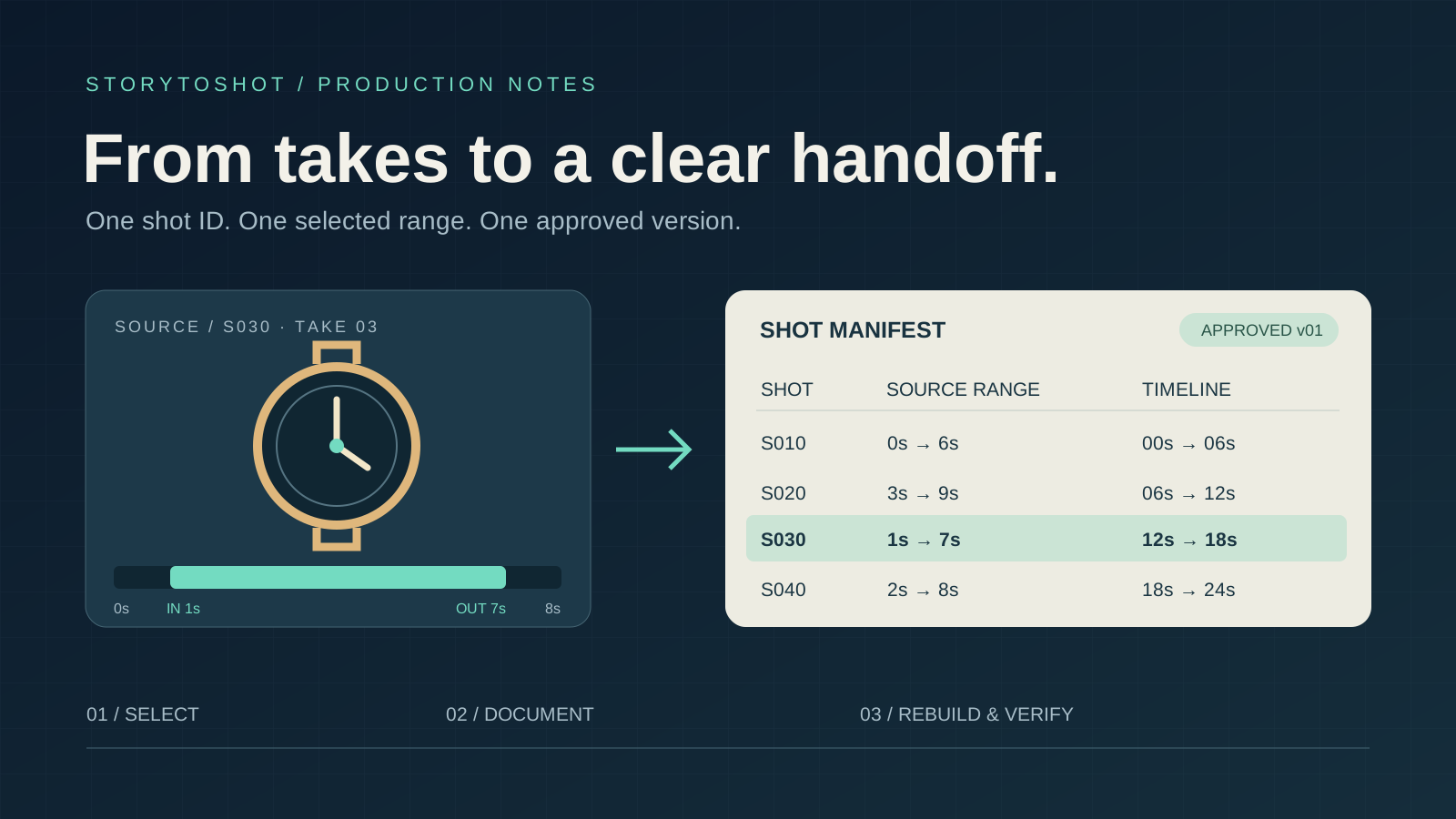
Each row needs a shot ID, exact filename, source in and out points, timeline position, selection status and notes. For S030, select [1.000 s, 7.000 s) from the named file and place it at [12.000 s, 18.000 s) on the timeline. The start is included and the end excluded, giving six seconds. Measure from the beginning of the source, not from a remembered player position. This example assumes an editing timeline organized at 24 frames per second, so these whole-second boundaries fall on frames. For another project, agree on frame numbers or timecode and document the start and end conventions. “Use the good part in the middle” cannot reproduce a cut. Also record the actual source frame rate and duration; the selection list’s timing convention does not define the media’s properties.
Provide handles only where the extra footage is usable
If the S030 source lasts eight seconds and the selected range runs from one to seven, there is theoretically one second on either side. Inspect both: malformed gears at the beginning or a different watch at the end are not usable handles. A note might say “0.5 seconds usable before the in point; no usable tail.” Retain the full original so the editor understands the boundary. Do not supply only a trimmed six-second clip and later request a longer pause. If the story needs more reaction time, revise the pacing or obtain additional material. Duplicated frames, slow motion and interpolation can change how motion reads and need their own review. Six seconds is this film’s provisional rhythm, not a box every shot must fill. The handoff list should accommodate approved timing changes.
Distinguish source media, review copies and sound
A practical package contains a README, selection list, source media, review copies, and audio or subtitles. Folder names can be simple; their roles must be clear. Burn shot IDs, versions and time markers into review copies so feedback has a location, but provide clean source files as well. Label temporary sound separately from sound approved for final use, and state whether embedded audio should remain. Before work begins, confirm the recipient’s requirements for container, codec, aspect ratio, resolution, frame rate and audio, then record the actual properties of each file. Identical extensions do not guarantee identical media specifications. Preserve original downloads and save conversions separately with processing notes. If color settings have not been agreed, mark them unresolved instead of claiming a consistent color workflow because two players look similar.
Turn known defects into bounded instructions
Avoid hiding details behind “mostly fine.” Write something actionable: “S020 has strap flicker at source time 2.4 s; the selection avoids it; do not extend the head by more than 0.3 s.” This locates the issue, explains the current treatment and bounds further adjustment. Separate defects affecting story information from aesthetic preferences. A changing watch design may undermine object identity; a warmer background lamp may simply reflect an approved style. Mark the former for revision if unresolved, while retaining the latter according to the agreed look. If an alternate changes hand position or eyeline, explain that it cannot replace the selection without checking adjacent shots. Do not relabel unresolved problems as creative effects just to make every status green. The editor needs explicit decisions and limitations, not an undisclosed obligation to repair them.
Freeze an identifiable delivery version
Name the first package watch_handoff_20261011_v01. Its README should state the packaging time, responsible person, selection-list version and open tasks. Check that every referenced file exists inside the package; do not rely on absolute paths from your computer or expiring preview links. Keep a separate record of asset sources, acquisition dates and permitted uses. Missing evidence remains unresolved: downloading an asset is not proof of commercial permission. The recipient does not need every failed candidate. Include selections and useful alternates in the main package, while archiving exploration separately. A checksum can help confirm transfer integrity, but it establishes matching bytes, not correct pictures or complete rights. Once frozen, correct an error with v02 and a change list rather than silently replacing the contents of v01.
Ask the recipient to reproduce the approved edit
Acceptance goes beyond opening every file. Ask someone who did not generate the footage to use only the README and list to assemble the four-shot, twenty-four-second rough cut in the agreed editing setup. Compare its order, selected ranges, framing, audio state and final pause with the review copy. If they must ask which version to use, improve the list instead of making verbal explanation a permanent dependency. Then unpack a copy into an empty directory and check that no media references point outside it. This tests a self-contained media package; it does not replace compatibility testing for a particular editing application’s project file. Record the checks passed, remaining issues and recipient confirmation. Advertising or distribution also requires separate final-file checks against the destination’s requirements; a successful source handoff does not certify the release master.
Connect the handoff back to the storyboard
Copy these fields to start: shot ID, narrative purpose, selected file, source in, source out, timeline position, actual media specifications, usable handles, sound status, known defects, rights status and approved version. Fill in S030 alone, then ask another person to locate the six selected seconds of starting gears. Expand to the film once that works. Put narrative purpose and shot IDs into the StoryToShot storyboard notes, and link actual generated files through a separate selection list. This preserves the original question of what each shot must communicate through to editing. The method suits a limited number of shots and collaborators. Multiple editors, long projects and continuing revisions need shared media management and a more formal change process. A handoff is complete when the recipient can reproduce the approved result and understands both the permitted adjustments and the remaining restrictions.